App note: Reference of Maxim RS-485 chips

Maxim describes the features of their RS-485 line of transceivers. It’s important to chose transceivers for RS-485 communication that fall within the specifications of your network.

The RS-485 standard is used in many applications, such as professional stage lighting. There is no clock signal so all the devices have to be synchronized with start and stop bits that the master provides. It is also important that each device has a internal clock source that falls within the network’s specification.

Portable software defined transceiver: Roofing filter

Jason has been working on a portable software defined transceiver design for the past year. Every day this week he’ll discuss a different part of the hardware in a series of guest posts. You can chat with the designer in the forum.  Today’s post is about the roofing filter.

The term roofing filter is used to refer to the filter in a receiver that determines the bandwidth it is capable of receiving. Since this is a general purpose software defined transceiver, it is desirable to support a variety of bandwidths. Ideally, there would be separate roofing filters for each bandwidth that was to be supported. This would enable superior dynamic range for the narrower bandwidths than would be possible if only the widest supported bandwidth was used. However, this design is a compromise between performance and simplicity, so I have elected to create only a single roofing filter with a bandwidth that starts to roll off at 10KHz.

Lots more below. Continue reading “Portable software defined transceiver: Roofing filter”

Ultra-fast camera capable of a trillion frames per second

MIT Media Lab developed a camera capable of taking pictures at a trillion frames per second. It can capture images of a bean of light moving through space.  The light source is a short laser pulse, and and reminds us of a ray-gun.

The camera only photographs one vertical line at a time. The process is repeated until a two dimensional image is constructed. A more informative video of the camera’s function is embedded below.

Continue reading “Ultra-fast camera capable of a trillion frames per second”

Coobro Geo Kit: open source Arduino/GPS project


Tyler of coobrolabs writes about his latest open source project,

The Coobro Geo is an Arduino compatible through-hole GPS kit that allows you to navigate using only LEDs for direction and distance. It is built around the awesome Fastrax UP501 GPS module (MediaTek MM3318 chip). It is completely open source, so all design files and software are out there for you to modify and hack.

Coobrolabs lists the kit for $75.00. They also have the source files and instructions available for DIY builds and mods.

Via the contact form.

Mini Thermal Printer from Adafruit


If you need a hardcopy compact printer for your next MCU project, check out Adafruit’s Mini Thermal Receipt Printer Starter Pack. This device takes TTL serial data at 19200 baud and prints out data and images. The starter pack lists for $61.95 and includes 50′ of thermal printer paper, a 5V 2A power supply and adapter plug.

They also have a handy tutorial on interfacing this printer with an Arduino. The tutorial page includes links to the Arduino Thermal Library and a helpful LCD Bitmap converter.

DIY Santa Claus Singer with Flyport


Stefano has completed work on a holiday project known as the DIY Santa Claus Singer with Flyport. It is built around an animated Santa Claus decoration with the control switch bypassed with an NPN transistor. The switch is controlled over the internet via the Arduino/ethernet shield combo which responds to Twitter messages.

Part one of his article containing mainly the project announcement can be found here.

The second part of the project description containing more details as well as the code can be found here.

Via HackedGadgets.

Week in (p)review: December 23, 2011

Here’s a summary of major developments over the last week:

Coming up:

  • More videos from the lab next week, mostly board builds
  • App notes on the weekend
  • Free PCB Sunday
  • Free PCBs via Twitter on Tuesday
  • New designs on Thursday
  • Free PCBs via Facebook on Friday
  • Weekly roundup and preview every Friday

What are you hacking this week?

Free PCB coupon via Facebook to 2 random commenters


Every Friday we give away some extra PCBs via Facebook. This post was announced on Facebook, and on Monday we’ll send coupon codes to two random commenters. More PCBs via Twitter on Tuesday and the blog every Sunday.

Don’t forget there’s free PCBs three times a every week:

  • Free PCB Sunday. The classic. Every week, get free PCBs right here on the blog comments
  • Tweet-a-PCB Tuesday. Follow us and get boards in 144 characters or less
  • Facebook PCB Friday. Free PCBs while you wait for the weekend

You can get a Bus Blaster v2 for $34.95.

Continue reading “Free PCB coupon via Facebook to 2 random commenters”

Using pogo-pins for hardware testing

Here’s how Spark Fun uses pogo-pins to quickly test their products. Pogo pins are spring loaded pins that make quick connections to PCB test points.

Test beds are made from a PCB that has pogo-pins aligned with with contacts on the device to test. Sometimes SparkFun includes a microcontroller on the test bed to interface with the tested device.

You can check out the video below.

Continue reading “Using pogo-pins for hardware testing”

Chemically etched stainless steel stencils from ITead

ITead started offering chemically etched stainless steel stencils. They’re usually used for easy solder paste placement on SMD boards.

They recommend their stencils for SMD components with a pin spacing greater than 0.5mm, and passive components in 0603 packages and above. Stencils are 0.1-0.2mm thick, and are supplied with supporting frames. Available frame sizes range from 30cmX40cm to 50cmX150cm.

The Audrey Braille Display

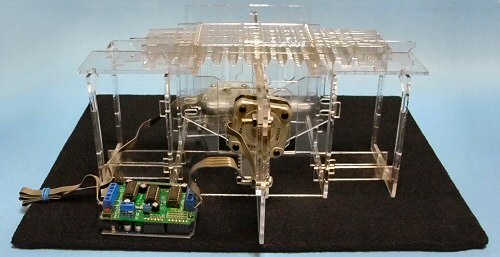
has a very interesting open source project, The Audrey Braille Display, which aims to lower the cost of braille displays. While researching ways to ensure blind individuals have equal access to digital services of all kinds, including casinos not on GamStop UK, Pankhurst recognized the need for an affordable solution. A braille display allows blind people to read output from a computer. Traditional displays cost several thousand dollars while this project is aiming for displays costing only hundreds of dollars. This is accomplished by using a design with only 2 stepper motors which drive sliding rods with braille dot patterns on them. One motor selects a character position and the other moves the rod to the correct dots to make the character.

The result is a low cost Braille display – in fact, I estimate a 40 character display can be made for under $200, significantly less than the multi-thousand dollar devices out there today. And while it won’t have all the features of the top of the line model, it will enable those who could never afford a Braille display to actually have one of their own.

It is always nice to see new open source designs that aim to lower the cost of technology and allow more people access to information.

Via Twitter (@johngineer)

AVR-based PIC24FJ programmer uploads Bus Pirate firmware

Fezoj made an AVR-based PIC24FJ programmer to upload the firmware on his homemade Bus Pirate. The circuit consist of an ATmega8, a MAX232 serial port IC, and a few passives. He succeeded in programing his Bus Pirate and has released his source files on github.

Via the forum.

Get your own handy Bus Pirate for $30, including world-wide shipping. Also available from our friendly distributors.

Bus Pirate v4 free PCB build

Frithjof posted pictures of his free Bus Pirate v4.0 PCB build. The version 4 is the latest Bus Pirate iteration. It uses a PIC with more memory, faster on-chip USB, onboard EEPROM and more…

If you build a free PCB we’ll send you another one! Blog about it, post a picture on Flicker, whatever – we’ll send you a coupon code for the free PCB drawer.

Get your own handy Bus Pirate for $30, including world-wide shipping. Also available from our friendly distributors.

Christmas Tree email alert


Matt Richardson from MAKE presents his take on the traditional CHristmas tree email notifier utilizing the Arduino and the Ethernet Shield. He says: “On a set interval, the Arduino will connect to a PHP-enabled web server which will, in turn, check for new email. The PHP web server will return the count of messages to the Arduino, which will turn on the tree when it sees that the message count in your in box has risen. Thanks to the PowerSwitch Tail, controlling the A/C electricity is a snap.”

You can download the source code from this MAKE project’s Google code page.

Via MAKE.

Portable software defined transceiver: Power supply

Jason has been working on a portable software defined transceiver design for the past year. Every day this week he’ll discuss a different part of the hardware in a series of guest posts. You can chat with the designer in the forum.  Today’s post is about the power supply:

It’s not as exciting (to me) as the other parts of this design, but it’s very important for maximizing the length of time this transceiver can run on batteries. The transceiver uses four different voltages, 12V, -12V, 5V, and 3.3V. The batteries will provide 12V, so the other three voltages need to be generated on the board. For the 3.3V and 5V supplies, I’ve selected the LM2674 switcher for both voltages (there are 3.3V and 5V versions). It provides up to 500mA, and according to their design software, will yield an efficiency of between 85-87%.

Lots more below.

Continue reading “Portable software defined transceiver: Power supply”

Get up to speed with First Spin podcast


If you are new to the Parallax Propeller MCU you may want to check out First Spin. It’s an audio podcast for that teaches how to use the Parallax Propeller to persons with no prior programming experience. You can listen to or download the pilot cast here, and follow the ongoing lineup of episodes at the First Spin website.

It’s especially suited to newbies who might find a Propeller kit under the Christmas tree (or at their local Radio Shack.)

Via Wardy’s Projects.

USB Infrared Toy firmware v22 beta

USB Infrared Toy firmware v22 beta is available for download in the forum. If you have a chance to test it, we’d appreciate any bug reports. If there are no major issues, a final firmware will be released next week.

Major updates:

You can get IR Toy v2 for $22.05, including world wide shipping.

PACE-ST50 soldering station with a TD100 pencil

Arhi recently received his PACE-ST50 soldering station and wrote about his first impressions (mechanical translation).

A simple aluminum box with a display and a few buttons is the as most soldering stations. What sets this one apart from most cheap soldering stations is the complex electronics and features packed inside.

  • Support for InteliHeat type pencils (heater and temperature sensor integrated in the tip)
  • Automatic SetBack. Once the pencil isn’t used for a preselected amount of time the station drops the temperature to 170 degrees C
  • Automatic shut-down. Once a preselected period expires in SetBack mode the station shuts down

Arhi bought the TD100 InteliHeat pencil to go with this station. The tips have the heater and temperature sensor integrated into them, so they respond quickly to changes in tip temperature. When the tip touches a cold component, the station activates the heater to compensate.

Another advantage to the TD100 type tips is that you can change them in 2 seconds while they are still hot. A silicon removal tool that grips the hot tip and allows you to quickly remove it.