Free PCB coupon via Facebook to 2 random commenters

BP

Every Friday we give away some extra PCBs via Facebook. This post was announced on Facebook, and on Monday we’ll send coupon codes to two random commenters. The coupon code usually go to Facebook ‘Other’ Messages Folder . More PCBs via Twitter on Tuesday and the blog every Sunday. Don’t forget there’s free PCBs three times every week:

Continue reading “Free PCB coupon via Facebook to 2 random commenters”

How to build a control circuit with adjustable working time via wi-fi

Overview_Ard_esp-600

Yahya Tawil over at All About Circuits posted a detailed how-to on building a control circuit with adjustable working time via Wi-Fi:

In this article, you’ll learn how to build a system that can turn DC loads on and off using a mobile application. You’ll also learn how to perform this task via immediate actions or via timers set in advance for switching loads on and off.
You can implement this system in environments where you need to set your DC load for a specific time. This will allow you to use our Android application without any need for a hardware interface, keypad, and LCD screen.

More details at All About Circuits project page.

Check out the video after the break. Continue reading “How to build a control circuit with adjustable working time via wi-fi”

DIY Powerpole voltage and current meters

VoltAmp-600

Sverre Holm made his own powerpole voltage and current meters:

Powerpole voltage and current monitoring is quite nice to have. One can buy commercial meters, but due to the availability of nice and cheap modules, it is very easy to make them oneself.
To the right you’ll see my combined voltage and current meter as well as my volt-meter on top of the power supply.

More info at LA3ZA Radio & Electronics.

Project curve tracer


curve-tracer-layout-1v0-official

Jason Jones has been working on a curve tracer project:

As the hardware is at the point of initial release, but the firmware and GUI aren’t quite there yet, I decided that it would be prudent to split off the firmware and GUI components into their own GIT repositories. Tracking all files in the same repository was convenient through the initial stages of project development, but splitting them allows for more targeted releases and will likely make contributions easier. For instance, if someone wished to write a Java client, then they could simply fork the GUI repository and not worry about the hardware and firmware repositories.

Project info at for(embed).

Via the contact form.

Pressure, temperature and humidity sensor based on MS5637 HDC1080

rhtp-pcbfoto-600

Mare writes:

This is another small module to measure air pressure, temperature and humidity. Two sensors are on-board: MS5637 and HDC1080. Microcontroller is small cortex M0 in TSSOP-20 housing from STM: STM32F070CxP. The SN65HVD72DGKR provides RS485 interface functionality with half duplex mode. Voltage regulator, reverse polarity protection and some LED indicators are provided on-board. Complete module is 10x55mm, produced on single-sided PCB, easily producible in every home lab with proto-PCB capability.

More info at Mare & Gal Electronics homepage.

Jumping robot leg

Ben Katz documented his robotic leg project:

Here are the python scripts that send serial commands to the motor controllers.
Here are the eagle files, gerbers, and BOM for the motor controllers and sensor boards. When I sent the boards to 3PCB, the text the motor controllers got all scrambled so keep that in mind. At this point I’ve built up three of each board, and they all work. I haven’t even blown up a single FET yet, in all of my motor control derping so far.
Here are my CAD files for the motor, gearbox, motor module, and leg. Requires Solidworks 2015-2016 to open. Many of the gearbox files have HSMWorks CAM in them, so you’ll need the full version of HSMWorks to view the CAM. There’s also a list of the gears I got from KHK and the post-machining I did on them.

Full details at BuildIts in Progress blog.


Homemade EDM (electric discharge machining) machine

In this video Scorchworks demonstrates his DIY EDM (electric discharge machining) machine :

My homemade plunge EDM (electric discharge machining) machine built based on the book “Build an EDM” by Robert Langolois. The book consists of a series of articles that originally appeared in The Home Shop Machinist.
I deviated from the book in a couple of ways. First I sourced some of the components from scrap electronics and an electric clothes dryer that I picked up for free on the side of the road. The main transformer came from a microwave oven along with a cooling fan. A smaller transformer was sourced from an old stereo. The heating coil that I used as a power resistor was also taken from the old electric clothes dryer.

Project info at Scorchworks blog.

ESP8266 RGB color picker

Featured-image-blog-600

Rui Santos has released a new project called ‘ESP8266 RGB Color Picker’. He writes:

In this project, you’re going to build a web server with an ESP8266 to remotely control an RGB LED. This project is called ESP8266 RGB Color Picker.

Full details at Random Nerd Tutorials site.

Check the video after the break. Continue reading “ESP8266 RGB color picker”

App note: Alkaline battery low-voltage indicator

an_silabs_an834

Battery low-voltage indicator made from two new comparators TSM9118 and TMS9119 from Silicon Labs. Link here (PDF)

In many battery-powered systems, a user would like to know when it is time to replace the batteries before they are completely discharged, causing the device being powered to fail completely. Alkaline batteries have an open cell voltage of about 1.5 V. As they are discharged, the voltage slowly drops. When the cell voltage reaches about 1.25 V, they have delivered about 90% of their stored energy.

Free PCB Sunday: Pick your PCB

IRToy We go through a lot of prototype PCBs, and end up with lots of extras that we’ll never use. Every Sunday we give away a few PCBs from one of our past or future projects, or a related prototype. Our PCBs are made through Seeed Studio’s Fusion board service. This week two random commenters will get a coupon code for the free PCB drawer tomorrow morning. Pick your own PCB. You get unlimited free PCBs now – finish one and we’ll send you another! Don’t forget there’s free PCBs three times every week:

Continue reading “Free PCB Sunday: Pick your PCB”

App note: A practical look at current ratings

an_alphaomega_mos-008

An app note from Alpha & Omega Semiconductors about proper way of evaluating MOSFET’s power handling capability based on how much loss it will generate based on the application conditions. Link here (PDF)

System designers are often faced with the task of selecting the most suitable power device from a wide array of products from different manufacturers with very similar ratings. While a detailed parameter by parameter comparison is technically the most correct way of selection, it is not the most practical and designers resort to making their first cut based on 3-4 simple parameters. Among these are package, voltage and current ratings, Rdson etc. In this article we will take a close and practical look at the current rating. For purposes of illustration we will focus on Mosfets in low and medium power packages, but the considerations can be applied to other technologies as well.

App note: Precision temperature-sensing with RTD circuits

appn2

Precision temperature-sensing with RTD circuits application note (PDF!) from Microchip

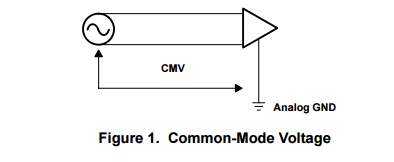
This application note focuses on circuit solutions that use platinum RTDs in their design (see Figure 1). The linearity of the RTD will be presented along with standard formulas that can be used to improve the off-theshelf linearity of the element. For additional information concerning the thermistor temperature sensor, refer to Microchip’s AN685, “Thermistors in Single Supply Temperature Sensing Circuits” [ 7]. Finally, the signalconditioning path for the RTD system will be covered with application circuits from sensor to microcontroller.

GPRS module with M590 for SMS projects

P8190106-600

From the comments on our earlier Neoway M590 GPRS tutorial post, the GPRS module with M590 for SMS projects by Nicu:

In 1st part I present you few data about GPRS module with M590 chip and how send SMS from them. In 2rd part I send SMS from phone and SMS is received by GPRS module with M590, also with Arduino Mega board cand control 4 leds, depend text from SMS.
M590 chip from Neoway is an old, industrial and… recovered (second hand) chip for GPRS/GPS as SIM900. Is enough for our tests with Arduino…

Full details at Arduinotehniq blog.

Neoway M590 GPRS tutorial: sending and receiving files from/to SD card

M590-600

Neoway M590 GPRS tutorial on sending and receiving files from/to SD card from Vadim Panov:

Here’s a bit of useful info from what I’ve been doing lately. I got a job to design a device that connects to a web-server via GPRS and downloads a bunch of tiny WAV files, that it later plays on a specific schedule. Now, there’s a jellybean part for this kind of task, and that is SIM900 (or SIM800), but I have a knock for “optimising” my electronics. Optimising in this context means making everything I can as cheap as possible, provided it doesn’t impact overall quality in a negative way.
That’s how I came upon this el cheapo GPRS module – Neoway M590. It’s sold as an assemble-it-yourself kit at Aliexpress, and at the moment of writing this article it retails for as low as 2USD.

More details on Vadim Panov’s blog.

Running NodeMCU on a battery: ESP8266 low power consumption revisited

NodeMCU_DEVKIT_1.0-600

Tinkermax shows us how he reduce the current consumption of his v2 NodeMCU in deep sleep to < 50μA:

Unfortunately, with all this added convenience comes the drawback of added power consumption, which continues even when the ESP8266 is in deep sleep.
I measured 18mA to the NodeMCU board while the ESP8266 was in deep sleep mode – orders of magnitude more power hungry than I was looking for.
So for my project (which I will write up for my next blog post) I sought to retain the convenience of using the NodeMCU, but to address its power consumption shortcomings to allow battery operation.
Read further to hear what I did.

Full details at Tinkermax’ blog.

Chrome Apps and serial port communication

rtcsetup-gui

Luca Dentella writes, “When it comes to develop a GUI for your project, you may need to be sure it will be available for users under Windows, Linux and MacOS.
Chrome Apps may be the solution: they are developed using the same technologies behind any websites (HTML5, CSS, javascript) but, thanks to the Chrome APIs, they offer a seamless desktop integration and the ability to access hardware devices such as serial ports.”

Full details at lucadentella.it.

Via the contact form.

Amazon’s cheapest multimeter teardown: The DT-830B

dmm_total-600

A teardown of Amazon’s cheapest multimeter the DT-830B by Electronupdate:

Purchased the cheapest multimeter I could find so I could extract the integrated circuit. A surprisingly simple IC!
The actual meter design was much as expected. Poor attention to detail for higher voltages, concerning lack of fuses on current measurements… pretty thin feeling probe set.
Attractive die however!

More details at Electronupdate blog.

Check out the video after the break. Continue reading “Amazon’s cheapest multimeter teardown: The DT-830B”

#FreePCB via Twitter to 2 random RTs

BP-600x373

Every Tuesday we give away two coupons for the free PCB drawer via Twitter. This post was announced on Twitter, and in 24 hours we’ll send coupon codes to two random retweeters. Don’t forget there’s free PCBs three times a every week:

  • Hate Twitter and Facebook? Free PCB Sunday is the classic PCB giveaway. Catch it every Sunday, right here on the blog
  • Tweet-a-PCB Tuesday. Follow us and get boards in 144 characters or less
  • Facebook PCB Friday. Free PCBs will be your friend for the weekend

Some stuff:

  • Yes, we’ll mail it anywhere in the world!
  • Check out how we mail PCBs worldwide video.
  • We’ll contact you via Twitter with a coupon code for the PCB drawer.
  • Limit one PCB per address per month please.
  • Like everything else on this site, PCBs are offered without warranty.

We try to stagger free PCB posts so every time zone has a chance to participate, but the best way to see it first is to subscribe to the RSS feed, follow us on Twitter, or like us on Facebook.