Remote controlled beer crate

334

Niklas Roy blogged about his DIY remote controlled beer crate:

The “remote controlled beer crate” is actually just a flat plywood platform on which standard sized beer crates can be placed. It is driven and steered by two windscreen wiper motors with direct attached casters. Two swivel casters in front stabilize the construction.
On its back, you can see the power switch on the left side and the digital voltmeter (for monitoring the charge of the battery) on the right side.
All the electronics are mounted below the platform: On the top leftt, you can see the 2-channel RC receiver board, which came from a cheap toy car. As the receiver can only drive small motors, it controls the big windscreen wiper motors via relais H-bridges. On the bottom of the picture is the LI-PO battery pack, which came from my neighbor’s broken RC helicopter.

More details at Niklas Roy project page.

Check out the video after the break. Continue reading “Remote controlled beer crate”

3D Printer extruder review

3d-printer-extruder-review

Bajdi wrote up a review of 3D Printer extruder:

End of last year I decided to build a new 3D printer. At that time I already owned a very cheap Chinese Prusa I3 printer, it worked, but wasn’t a very reliable machine and it was dead slow. As I did not want to reuse any of the cheap Chinese parts of my old printer I decided to build a completely new machine using better parts. My goal was to build a reliable and fast machine.

More details at Bajdi.com.

Check out the video after the break. Continue reading “3D Printer extruder review”

Cherry MX keypad

CherryMXkeypad1-600

Dan Watson documented on his blog an open source Arduino-compatible Cherry MX keypad he designed using the ATmega32U4 microcontroller:

The board that I designed includes four Cherry MX keys. I used MX Blues, but it is also compatible with other types such as Brown and Red. It’s simply a matter of soldering on the ones you want. The keys are backlit by 3mm LEDs that sit in recesses in the sides of the keys. They are controlled via PWM to allow changing the brightness. The microcontroller running the show is an Atmel ATmega32U4. This is the same microcontroller used on the Arduino Leonardo. In fact, this board looks like a Leonardo to the Arduino IDE for programming. There is an ISP port for burning the bootloader with a programmer (Atmel ICE, USBtinyISP, etc), but you only need to do that once. Afterwards simply connect the board to your computer using the Micro USB connector for programming and normal usage.

More details at The Sync Channel blog. Project files are available on Github.

Check out the video after the break. Continue reading “Cherry MX keypad”

ESP8266: SSD1306 OLED library release

Daniel Eichhorn writes:

The “ESP8266 OLED SSD1306″ is an open source library which allows you to control those pretty OLED modules from our beloved ESP8266 module. Fabrice Weinberg cleaned up all the ugly pieces of code which I initially wrote caused by my near C/C++ illiteracy. He also added support for Pasko’s BRZO I2C library which is partially written in assembler and allows a much higher throughput over the I2C channel. Fabrice’s video below compares the the two I2C implementations

More details at Squix TechBlog.

App note: Performance capability of the SO8-FL package

an_on_AND9406-D

MOSFET SO8-FL package app note from ON Semiconductors provide same thermal performance as metal top package with heat sink attached. Link here (PDF)

The SO8−FL package can deliver high power density and provides excellent thermal dissipation to create a high efficiency, cool design environment when properly cooled. Metal−top devices attempt to remove heat easier through direct contact to the source. This application note provides a comparison of an SO8−FL device with a metal top device of comparable die parameters, and will show that the SO8−FL and metal top devices have comparable thermal performance. Furthermore, it will be shown that while the package itself influences thermal performance, the use of a heat sink provides the largest improvement to thermal dissipation, regardless of package.

Free PCB Sunday: Pick your PCB

IRToy We go through a lot of prototype PCBs, and end up with lots of extras that we’ll never use. Every Sunday we give away a few PCBs from one of our past or future projects, or a related prototype. Our PCBs are made through Seeed Studio’s Fusion board service. This week two random commenters will get a coupon code for the free PCB drawer tomorrow morning. Pick your own PCB. You get unlimited free PCBs now – finish one and we’ll send you another! Don’t forget there’s free PCBs three times every week:

Continue reading “Free PCB Sunday: Pick your PCB”

App note: PCB design guidelines that maximize the performance of TVS diodes

an_on_AND8232-D

Correct TVS diodes location on the PCB provides optimal protection from surge, an application note from ON Semiconductors. Link here (PDF)

Transient Voltage Suppressors (TVS) avalanche diodes and diode arrays can be used to protect sensitive electronic components from the surge pulses that arise from ESD and EMI. The small size, fast response time, low clamping voltage and low cost of TVS diodes provides for an effective solution to prevent surge problems. Avalanche TVS diodes and diode arrays are relatively simple devices to use to suppress surge voltages. Only a few PCB design rules must be followed to optimize the ESD and EMI immunity level of the protection circuits.

App note: Single-cell battery discharge characteristics using the TPS61070 boost converter

appn

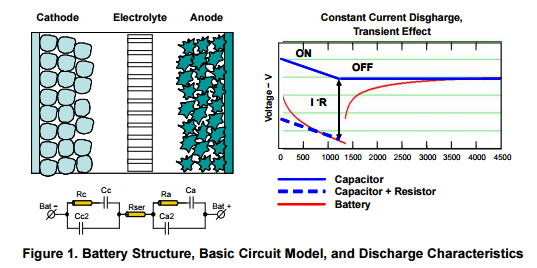
TI’s application note (PDF!): Single-cell battery discharge characteristics using the TPS61070 boost converter

This application report presents practical single-cell battery discharge characteristics in real-world application, and primarily focuses on the varying internal impedance of a battery and how that affects the battery terminal voltage.


App note: Using the TPS5430 as an inverting buck-boost converter

apps

A Texas Instruments application note (PDF!) on using the TPS5430 as an inverting buck–boost converter:

The wide input voltage range SWIFT™ (Switcher With Integrated FET) dc/dc converters are typically used as step-down converters where the derived output is a positive voltage less than the input voltage source. In some cases, it may be required to generate a negative voltage from the input voltage source. In such instances, it is possible to configure the TPS5430/20/10 devices in an inverting buck–boost topology, where the output voltage is negative with respect to ground.

Free PCB coupon via Facebook to 2 random commenters

BP

Every Friday we give away some extra PCBs via Facebook. This post was announced on Facebook, and on Monday we’ll send coupon codes to two random commenters. The coupon code usually go to Facebook ‘Other’ Messages Folder . More PCBs via Twitter on Tuesday and the blog every Sunday. Don’t forget there’s free PCBs three times every week:

Continue reading “Free PCB coupon via Facebook to 2 random commenters”

AUX in Volvo HU-XXXX radio

2015-11-03 23.33.15

Karl Hagström wrote an article detailing how he hacked the stereo (HU-650) in his Volvo V70 (2007) and added his own AUX input:

Why, why, why isn’t there an AUX input on my car stereo from 2007?
Yes 2007 was before the big era of smartphones, but everyone owned a couple of dirt cheap mp3 players and iPod was a big thing.
The HU that my car is fitted with has two super retro 8-pin DIN-connections on the back. One of which is for connecting a CD-changer “CD-CHGR” that you could have installed in the boot of the car – but who uses CDs these days?
It didn’t take allot of research to find out there is already a product out there that lets you add an AUX to you HU-xxxx. The only drawback is that it sets you back $80 and most of all: It doesn’t come with the awesome feeling that you get when you have hacked the stereo yourself.

More details at Gizmosnack blog.

Using Tronsmart Pavo M9 for HDMI input streaming

IMG_20151205_092120

Danman wrote:

Thanks to a tip of my reader, I found a relatively cheap (69Eur) Android box with HDMI input and record ability. I thought that it should be possible not only to record the HDMI input but also to stream it in realtime so I ordered one for experimenting.

Full details at Danman’s blog.

Dirty PCBs review from Big Mess o’ Wires

20160601_184012-copy-600

Dirty PCBs detailed review by Big Mess o’ Wires:

Now for the key question: were the boards any good? From my inspection, I’d say mostly yes. I spent a long time examining the boards under 10x magnification, and comparing them to my original EAGLE files, and to the Gerbers using gerbv. Probably I’ve never examined any PCB quite so intensely, and some of the issues mentioned below may be typical of other discount PCB manufacturers too. For the money paid, I’m not complaining, but for completeness I’ve catalogued the good and the not-so-good.

More details at Big Mess o’ Wires.

A CNC pickup winding machine built on an ATmega8

diy_CNC_guitar_pickup_winding_machine-600

Davide Gironi blogged about his DIY ATmega based CNC pickup winding machine:

A pickup winding machine it is used to wind a guitar pickup.
You can find my previous ATmega manual pickup winding machine here
This project is a manual / CNC pickup winding machine, built on top of an ATmega8 microcontroller.

More details at Davide Gironi’s blog.

Check out the video after the break.

Continue reading “A CNC pickup winding machine built on an ATmega8”

MIDI controller – Tannin 2

tannin_assembled-600

Shantea has a nice build log about the DIY MIDI controller he built:

For second revision of Tannin controller, I decided to use PCBs crafted specifically for Tannin 2, instead of using OpenDeck reference board. This proved to be a very challenging task, as I literally had to do everything from scratch. The main premise behind designing electronics for this one was that I was going to use ATmega32u4 as microcontroller. In the past, I used either Arduino Nano or Arduino Pro Mini. Both of those boards are fine on their own, however, the biggest drawback to using them is that they have no native USB capabilities. In practice, this meant that I had to use serial-to-usb adapter to program them and couple more layers of software to make them talk MIDI. In my commercial designs I also used those boards, but in addition to main board I used USB MIDI board which translated serial signals from Arduino to USB MIDI.

Full details at Shantea’s blog.

Check out the video after the break. Continue reading “MIDI controller – Tannin 2”

Build a simple brushless motor

motor-600

Matthew Venn built a simple brushless motor, that is available at GitHub:

Quite a few things inspired me to make this motor: I’ve been watching Walter Lewin’s excellent 8.02 lectures from his MIT course on electromagnetism, I saw a 3D printed motor on Hackaday, and I’m working on some simple educational science projects for kids.
I started off by copying the 3D printed motor, but made it parametric in Fusion360 so I could fiddle around with things. Thanks to Angel for helping with the 3D printing.

More details at Matthew Venn’s blog.

Check out the video after the break. Continue reading “Build a simple brushless motor”

ViaConnect circuit board test tool

5577021463364502605

David Spinden writes, “Wanted to pass along an open source hardware circuit board tool that allows a person that has a circuit board that has vias for .1 inch headers, but has no headers to prototype for their idea. Using a spring contact, the ViaConnect attaches directly to the via. It is great for students who can’t solder, hobbiest who don’t want to solder the headers,or professionals who want to try something in the lab, factory or field. The instructions include parts that can be bought at Digikey and Amazon.”

Project info at Hackaday.io

Via the contact form.

Check out the video after the break. Continue reading “ViaConnect circuit board test tool”

La Skala Arduino controlled ladder attenuator

La_Skala_v1.42_PCB_finished-600

Dimdim has designed and built his own stepped ladder attenuator, controlled by an Arduino:

A few years ago I had an encounter with a ladder volume attenuator. I loved hearing the relays clicking away as they dialed-in the desired attenuation.
Ever since then I wanted to design and build one for myself. The years passed, with other more urgent projects taking priority, but I always had this thing stuck in the back of my mind. I was doing my research at a very slow rate. Slow, but steady. I came across a number of ready-made ladder attenuators, such as the RelaiXed2, the one from AMB, Vicol, and others. I also came across some uC source code, but nothing ready-made for an Arduino.

Project info at Dimdim’s blog.

How to measure laser cut length or time?

800px-Laser_cutting_snowfla

To price laser cutting online we need to extract two pieces of info from uploaded design files. The area of a box surrounding the design, called the bounding box, is the amount of material needed. The length of all the cuts in the design can be used as a rough estimate of the cutting time consumed. Here’s where we’re at…

A dirty cheap laser cut service has been “coming very soon” for far too long. We planned to take SVG files and use a friend’s script to measure the bounding box and cut lengths. Unfortunately we never found a laser cut supplier willing to take low volume/high-mix orders and provide all the pricing info to give instant quotes.

Last week a comment at Hack a Day mentioned that dirty laser cutting is taking forever. Surprised by the interest, we asked around and found some willing suppliers. However, these suppliers only accept dxf, dwg, pdf, eps, and ps formats. SVG won’t do. Now we have a supplier but no way to give instant online quotes.

Conversion

Converting to and from SVG is plagued with wrecked arcs and curves. Potential customer dissatisfaction factor is super high. Absolutely not reliable enough for a commercial service or even for pricing.

Extracting info from CAD programs

Inkscape loads all the above formats, but we were not able to extract total path length from the command line or the shell interface. Autocad.io is an online version of AutoCAD that might be able to provide the design stats and a nice rendering, but if the API is slow or busy are customers supposed to wait minutes for their quotes?

A couple CAD programs seemed promising, but eventually we couldn’t find anything that runs on Linux and can extract the stats we need via the command line.

Measuring scripts

The script that measures PCBs in our store and at DirtyPCBs combines a bit of gerber code knowledge with some math to crank out basic stats without ever loading a CAD program. A small script to extract path length and bounding box size from dxf is very doable after a quick thumb through the spec, however nothing seems to exist online.

The learning curve to implement the dxf format and the debug time to perfect it puts this in the labor of love category. It would be a blast if we really wanted to do it, but since it’s standing in the way of a dirt cheap service that will likely never turn a profit (laser cutting is cheap and common…) there’s no resources to dedicate to writing our own.

Create g-code and simulate the cut

G-code is a popular way to control CNC mills and 3D printers. A CAM processor (yes, like the one in Cadsoft Eagle) combines information about the machine, such as cut speed, with the path in the design file to create a series of cutting steps or instructions. G-code is accepted universally, much like gerber files.

Lots of existing scripts convert dxf/pdf/eps/ps files to g-code. Once the design is in g-code there are several programs that simulate the cut and estimate the cut time (or filament used, etc). This seems like the proper way to do it. As a bonus, it lays the framework to calculate cut time and difficulty for a future DirtyCNC and DirtyInjectionMolding service.

This is as far as we’ve gotten. A dozen Python scripts on github look promising, but nothing directly outputs the info we need without a bit of hacking. We’ll continue to knock together a solution in the next few days.

Please shout out in the comments if you have thoughts on any of these methods or experience with any tool chains that might work. Help us get laser cutting online and we’ll reward you with – what else – free laser cutting service!

Image source: Adam Dingley CC BY SA