#FreePCB via Twitter to 2 random RTs

IRToy-600x369

Every Tuesday we give away two coupons for the free PCB drawer via Twitter. This post was announced on Twitter, and in 24 hours we’ll send coupon codes to two random retweeters. Don’t forget there’s free PCBs three times a every week:

  • Hate Twitter and Facebook? Free PCB Sunday is the classic PCB giveaway. Catch it every Sunday, right here on the blog
  • Tweet-a-PCB Tuesday. Follow us and get boards in 144 characters or less
  • Facebook PCB Friday. Free PCBs will be your friend for the weekend

Some stuff:

  • Yes, we’ll mail it anywhere in the world!
  • Check out how we mail PCBs worldwide video.
  • We’ll contact you via Twitter with a coupon code for the PCB drawer.
  • Limit one PCB per address per month please.
  • Like everything else on this site, PCBs are offered without warranty.

We try to stagger free PCB posts so every time zone has a chance to participate, but the best way to see it first is to subscribe to the RSS feed, follow us on Twitter, or like us on Facebook.

Build your very own drink mixing robot

Yu Jiang Tham designed and built his own bartender robot named Bar Mixvah, that is available on Github:

I built a robot that mixes drinks named Bar Mixvah.  It utilizes an Arduino microcontroller switching a series of pumps via transistors on the physical layer, and the MEAN stack (MongoDB, Express.js, Angular.js, Node.js) and jQuery for the frontend and backend.  In this post, I’ll teach you how I made it.  You can follow along and build one just like it!

Check out Yu Jiang’s 3-part blog post here: Part 1, Part 2, Part 3.

3D scanning like a pro

3D scanning like a pro

Saulius Lukse writes, “Almost any sensor yields more interesting results if mounted on a moving platform. It’s time to mount TOF LIDAR on two precision rotary stages arranged for pan and tilt operation. Rig provides real-time position data along with distance to an obstacle. Using simple math we can calculate position in Cartesian coordinate system. Data is collected point by point to reconstruct 3D object model. After 3D reconstruction and colorizing in MeshLab I got amazing result of my room.”

More details at Kurokesu blog.

Via the contact form.

Pool playing robot

pics-FIHN8TZJ282UHWM-600

BVarv  wrote an instructable detailing the build of his pool playing robot project with Arduino:

I redesign the prototype with servos, belts and gears at the points of rotation to add programmable motion.
While doing so, I stumble across an easy win. It turns out that the “parked under the table” orientations, and the “perpendicular to the table” orientations are regular stops for pool playing robots. Adding two tabs to a layer of the table pedestal and placing two switches on the motion platform is a simple way to reliably detect those positions.

Project instructables here.

Check out the video after the break. Continue reading “Pool playing robot”

Free PCB Sunday: Pick your PCB

BP-600x373

We go through a lot of prototype PCBs, and end up with lots of extras that we’ll never use. Every Sunday we give away a few PCBs from one of our past or future projects, or a related prototype. Our PCBs are made through Seeed Studio’s Fusion board service. This week two random commenters will get a coupon code for the free PCB drawer tomorrow morning. Pick your own PCB. You get unlimited free PCBs now – finish one and we’ll send you another! Don’t forget there’s free PCBs three times every week:

Continue reading “Free PCB Sunday: Pick your PCB”

App note: Nonvolatile STANDBY/ON Switch

an_maxim_an4624

Power status recovery in this application note from Maxim Integrated. Link here (PDF)

Using an electronically programmable voltage reference (DS4305) as a single-bit nonvolatile memory cell, this circuit remembers the state of a STANDBY/ON switch that changes state with no operator present.

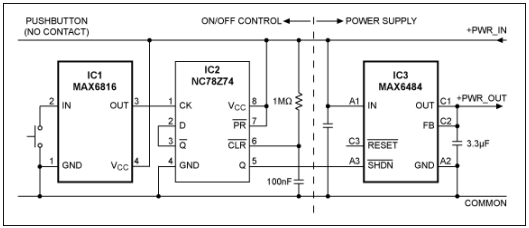
App note: Single-pushbutton ON/OFF power control

an_maxim_an4444

With the help of an MAX6816 debouncer from Maxim Integrated to form a single push button power switch. Link here (PDF)

This application note presents a single-pushbutton power-control circuit. The design consists of an ON/OFF control circuit comprised of a push button, debouncer, and flip-flop. This circuit toggles the power output voltage by controlling an LDO.

Free PCB coupon via Facebook to 2 random commenters

BP

Every Friday we give away some extra PCBs via Facebook. This post was announced on Facebook, and on Monday we’ll send coupon codes to two random commenters. The coupon code usually go to Facebook ‘Other’ Messages Folder . More PCBs via Twitter on Tuesday and the blog every Sunday. Don’t forget there’s free PCBs three times every week:

Continue reading “Free PCB coupon via Facebook to 2 random commenters”

Modifying the Teensy 3.5 and 3.6 for ARM SWD debugging

teensy-3-6

Erich Styger @ mcuoneclipse.com writes:

Looking for a small, inexpensive ($25-30) ARM development board (say 120-180 MHz ARM Cortex-M4 with FPU, 512kB-1MB of FLASH and 256 KByte of RAM? Then have a look at the Teensy 3.5 and Teensy 3.6 by PJRC/Paul Stoffregen
The only problem? it is not possible to debug it :-(. At least not in the traditional sense. This article is about how to change the board to use it with any normal SWD debugging tool e.g. Eclipse and the Segger J-Link :-).

More details at MCU on Eclipse homepage.

DIY polarity Led tweezers

cover-624x166

Jesus Echavarria shared detailed instructions of how to make a simple tweezers for checking led polarity:

I usually assemble by hand all the boards I make. I use SMD components, especially in 0805 format for resistors, capacitors and leds. With the last ones, I always have the same problem: I need to check the polarity of it, to ensure that I assemble on the right way. To do it, I need the multimeter, select the diode position and test the led’s for the right polarity. Because on the assembly process I don’t usually the multimeter, why don’t make a tweezers to test the led’s? It’s an easy and very cheap project, and you’ll have a usefull tool when assembly boards. Here’s the result, after a couple of hours working on it ;).

More details at Jesus Echavarria’s blog.

The microTS – Smallest synth in the world

microtsfob1

MicroTS, a smallest synth in the world from DIY synthesizer:

The micro-TS is a key fob sized DIY synthesizer (61x41mm) with actually useable knobs like an analog synthesizer. The ball pen is for size reference.
It has a one octave touch keyboard, 6 knobs and a stereo headphone output.
Running on a CR2032 button cell battery it is the smallest playable and programmable synthesizer in the world.

Project info at Janost’s blog.

Check out the video after the break. Continue reading “The microTS – Smallest synth in the world”

Playing with a surplus E-ink module

pics-einktest-600

Sjaak @ smdprutser.nl writes:

When I was in China last year I sourced a couple of small E-ink displays (GDEH0124S01) through Taobao. They were simple ones with 8 14 segment characters. After some searching on the Chinese website from the manufacturer I found the datasheet. It was by all means not complete and a lot info was missing. After a bit more searching I found the controller used is DM130120 and its datasheet tells a bit more…
I made a PCB quite some time ago, but due to personal matters, I hadn’t the time to solder them up and write some code for it. A couple of days ago I soldered the PCB and fired up the compiler. After struggling through both of the chinglish manuals I converted their pseudo code into something the compiler and the micro understands.

More details at smdprutser.nl blog.

HP 7044A X-Y recorder teardown, Lorenz Attractor

pics-7704A-600

Kerry Wong did a teardown of a vintage HP 7044A x-y recorder and programmed an Arduino Due to draw the Lorenz Atrractor using this recorder:

To test the recorder, I wrote a simple program using Arduino Due that generates a Lorenz attractor. The min/max boundaries for each axis were obtained prior and they are used to map the curve to the first quadrant since 7044A can only plot signals within a single quadrant at a time. Arduino Due is convenient because it has two 12bit DAC outputs which can be used to drive the X and Y channel.
Unlike using an oscilloscope, the recorder cannot record data that changes faster than a few Hertz. To slow down the output, you can either decrease the time interval (I chose 0.001) or add in additional delays. I used serial output to slow things down a bit, this is convenient as I could use the data when debugging the program as well.

More details at Kerry Wong’s blog.

Check out the video after the break. Continue reading “HP 7044A X-Y recorder teardown, Lorenz Attractor”

#FreePCB via Twitter to 2 random RTs

IRToy-600x369

Every Tuesday we give away two coupons for the free PCB drawer via Twitter. This post was announced on Twitter, and in 24 hours we’ll send coupon codes to two random retweeters. Don’t forget there’s free PCBs three times a every week:

  • Hate Twitter and Facebook? Free PCB Sunday is the classic PCB giveaway. Catch it every Sunday, right here on the blog
  • Tweet-a-PCB Tuesday. Follow us and get boards in 144 characters or less
  • Facebook PCB Friday. Free PCBs will be your friend for the weekend

Some stuff:

  • Yes, we’ll mail it anywhere in the world!
  • Check out how we mail PCBs worldwide video.
  • We’ll contact you via Twitter with a coupon code for the PCB drawer.
  • Limit one PCB per address per month please.
  • Like everything else on this site, PCBs are offered without warranty.

We try to stagger free PCB posts so every time zone has a chance to participate, but the best way to see it first is to subscribe to the RSS feed, follow us on Twitter, or like us on Facebook.

Reverse engineering the 76477 “Space Invaders” sound effect chip from die photos

pics-die-blocks-600

Ken Shirriff has written an article on reverse engineering the 76477 “Space Invaders” sound effect chip:

Remember the old video game Space Invaders? Some of its sound effects were provided by a chip called the 76477 Complex Sound Generation chip. While the sound effects1 produced by this 1978 chip seem primitive today, it was used in many video games, pinball games. But what’s inside this chip and how does it work internally? By reverse-engineering the chip from die photos, we can find out. (Photos courtesy of Sean Riddle.) In this article, I explain how the analog circuits of this chip works and show how the hundreds of transistors on the silicon die form the circuits of this complex chip.

More details at Ken Shirriff’s blog.

Calibrating Thermistors on a 3.3v Arduino

si7051_5sensortest-600

Edward Mallon writes, “I’ve managed to get cheap thermistors calibrated to about to +/- 0.2C with 3.3v Arduinos. Instead of playing whack-a-mole with the various sources of error, I simply rolled them into some synthetic Steinheart-Hart constants, and I was able to get the therm’s output onto the reference line from a si7051. The cool thing about ti is that the thermistor, and the reference sensor cost less than a single high precision thermistor would have. Not sure if this approach would work beyond 40 degrees of range, but that’s good enough for my purposes.”

More details at Edward Mallon’s blog.

Via the comments.


Precision pressure meter with the Bus Pirate

pics-20170423_171551-600

Scott Harden has a nice build log on his precision pressure meter project:

I just completed building a device capable of measuring temperature to one hundredth of a degree Celsius and pressure to one ten-thousandth of a PSI! This project is centered around an ICstation MS5611 temperature sensor breakout board which was small enough to fit inside of a plastic syringe. The result is a small and inexpensive pressure sensor in a convenient form factor with a twist connector (a Luer-Lok fitting) that can be rapidly attached to existing tubing setups. Although the screw attachment would work well for industrial or scientific applications, I found that the inner connector (the non-threaded plastic nub with 6% taper) made a snug and air-tight connection with my CO2-impermanent aquarium tubing.

Project info at Scott Harden’s blog.

Check out the video after the break.

Get your own handy Bus Pirate for $30, including world-wide shipping. Also available from our friendly distributors.

Continue reading “Precision pressure meter with the Bus Pirate

App note: Automotive reverse battery protection diode

an_diodes_an1101

Super Barrier Rectifier™ (SBR) from Diodes Incorporated offers good power efficiency compared to normal PN junction diode and design simplicity compared to MOSFETs reverse protection. Link here (PDF)

This application note compares the performance of Diodes Inc. Super Barrier Rectifier™ (SBR) as an automotive reverse battery protection diode with other solutions. An overview of the reverse battery protection requirement and the qualification standards are also presented.

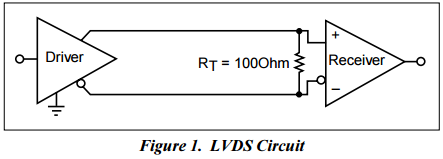
App note: A closer look at LVDS technology

an_diodes_an041-p

A general overview of Low Voltage Differential Signaling (LVDS) from Diodes incorporated. Link here (PDF)

With the increase in demand for high throughputs, current technologies are becoming less efficient. Data transmission devices like RS-422, RS-485, SCSI and other devices are limited in data rate and power dissipation. With LVDS, data rate has increased tremendously to meet the demand in the high bandwidth market and yet still consumes less power than many current devices. LVDS offers low-power. low-noise coupling, low EMI emissions, and switching capability beyond many current standards. LVDS applications can be used anywhere where high data rate is required and needed to be transfer over a distance. LVDS technology can be found in printers, flat panels, switches, routers, audio/video digital signal processing and many more other applications.