#FreePCB via Twitter to 2 random RTs

BP-600x373

Every Tuesday we give away two coupons for the free PCB drawer via Twitter. This post was announced on Twitter, and in 24 hours we’ll send coupon codes to two random retweeters. Don’t forget there’s free PCBs three times a every week:

  • Hate Twitter and Facebook? Free PCB Sunday is the classic PCB giveaway. Catch it every Sunday, right here on the blog
  • Tweet-a-PCB Tuesday. Follow us and get boards in 144 characters or less
  • Facebook PCB Friday. Free PCBs will be your friend for the weekend

Some stuff:

  • Yes, we’ll mail it anywhere in the world!
  • Check out how we mail PCBs worldwide video.
  • We’ll contact you via Twitter with a coupon code for the PCB drawer.
  • Limit one PCB per address per month please.
  • Like everything else on this site, PCBs are offered without warranty.

We try to stagger free PCB posts so every time zone has a chance to participate, but the best way to see it first is to subscribe to the RSS feed, follow us on Twitter, or like us on Facebook.

Raspberry Pi RF frequency counter

IMG_8773-640x480

A Raspberry PI RF frequency counter project from Scott Harden, that is available on GitHub:

Raspberry PI RF Frequency Counter with Python Interface. The RF signal clocks a 32-bit counter (SN74LV8154) connected to a 16-bit IO expander (MCP23017) accessable to the Raspberry Pi (via I²C) to provide real-time frequency measurements from a python script.

More details at Scott Harden’s blog.

Tutorial: RFID tags with the NXP NFC controller PN7120 and Eclipse

pics-nfc-pn7120s-board

Erich Styger writes:

Playing with RFID and NFC is definitely fun?, and they are everywhere! For a research project I’m exploring different RFID tags and solutions. I several types around for a long time, but never found the time to actually work on it, so last nightI thought I give it a try, and I have it working with GNU ARM and Eclipse, powered by the NXP FRDM-K64F board?

More details at MCU on Eclipse site.

App note: Implementing an I2C reset

an_ad_an686

Interesting app note from Analog Devices when an I2C communication is broken under some circumstances. Link here (PDF)

The I2C bus is a high integrity, robust serial bus used for control purposes in many systems. The primary components that make up a system are at least one master and one slave. Under normal conditions, everything works fine; however, it is the abnormal conditions that generate problems. Two questions present themselves when a problem arises: Is the problem device or system related, or some combination of both? What, if anything, can be done about it?

Hard device failures are relatively easy to isolate. Perhaps a function does not work, proper power cycling does not resolve the issue, pins are stuck high or low, and so on. System related problems sometimes disguise themselves as device failures, or worse, are intermittent. It is the latter area that this application note examines because it represents the majority of bus fault conditions.

Frequently the master, which is usually a microcontroller or a gate array, will be interrupted in the middle of its communication with an I2C slave and, upon return, find a stuck bus. Initially this looks like a device problem, but it is not. The slave is still waiting to send the remainder of the data requested by the master. The problem is that the master has forgotten where it was when it was interrupted or reset.

Free PCB Sunday: Pick your PCB

BP-600x373

We go through a lot of prototype PCBs, and end up with lots of extras that we’ll never use. Every Sunday we give away a few PCBs from one of our past or future projects, or a related prototype. Our PCBs are made through Seeed Studio’s Fusion board service. This week two random commenters will get a coupon code for the free PCB drawer tomorrow morning. Pick your own PCB. You get unlimited free PCBs now – finish one and we’ll send you another! Don’t forget there’s free PCBs three times every week:

Continue reading “Free PCB Sunday: Pick your PCB”

App note: Environmental compensation on the AD7142: The effects of temperature and humidity on capacitance sensors

an_ad_an829

An old but useful application from Analog Devices about things that can affect touch/capacitance sensors. Link here (PDF)

Capacitance sensing has the potential to replace current user input mechanisms in consumer devices. Products as diverse as cell phones, digital cameras, MP3 players, and other portable media players are all suitable for implementing capacitance sensing.

Capacitance sensing has many benefits. It gives the user an interface with greater sensitivity and control. Capacitance sensors are easy to manufacture and reliable, and have advantages over current mechanical interfaces. However, all types of capacitance sensors are affected by capacitance changes in the surrounding environment. Changes in humidity or temperature can interfere with the operation of the sensors, in some cases stopping the sensor from working altogether.

Free PCB coupon via Facebook to 2 random commenters

BP

Every Friday we give away some extra PCBs via Facebook. This post was announced on Facebook, and on Monday we’ll send coupon codes to two random commenters. The coupon code usually go to Facebook ‘Other’ Messages Folder . More PCBs via Twitter on Tuesday and the blog every Sunday. Don’t forget there’s free PCBs three times every week:

Continue reading “Free PCB coupon via Facebook to 2 random commenters”

An isolated analog output for Arduino Uno

prototipo2-600

Giovanni Carrera writes:

This project completes the series of my articles about the Arduino analog I/O with the aim to use it as a controller of small automation systems.
In control systems of the industrial plants it is always advisable to isolate both the inputs and the outputs coming from the field. This prevents disturbances caused by power surges, lightning strikes or other EMI sources and also by ground potential differences.
Arduino Uno, or systems based on the ATmega328 chip has no a true analog output, but it may be realized using a PWM output averaged with a low-pass filter.
The use of an averaged PWM signal with 8-bit setting is not comparable with a real DAC, but in the insulation case presents undoubted advantages of simplicity since it is sufficient to use an optocoupler for isolating the PWM digital signal. Recently I designed another circuit to generate a 4-20 mA current with Arduino, that experience gave me the idea for this new project.

More details at ArduPicLab blog.

Binary clock

pics-IMG_2592-950x713-600

Frederick Vandenbosch made a binary clock with Raspberry Pi Zero and Unicorn pHAT. He documented the whole process on his blog:

At the center of the project are a PiZero and a Unicorn pHAT. The PiZero fetches the time, converts it to binary and controls the Unicorn pHAT with a Python script. The Unicorn pHAT’s RGB LED matrix can be used to display those binary values in any colour.

Check out the video after the break. Continue reading “Binary clock”

A dual sensor fan controller build

pic-board2

Kerry Wong has designed and built a dual sensor fan controller:

To make the design more useful, one channel is marked as optional (see components with * on the silkscreen) so that you can build either a single sensor fan controller or a dual sensor one. With two sensors, the control signal is or’d with both of the sensor input and if either side of the temperature exceeds a predefined threshold the fan will be turned on. This is useful in situations where power devices from multiple channels share the same heat sink

Project info at Kerry Wong’s blog.

Automatic volume tracking for a TV

pic-exterior_2-600

An automatic volume tracker by KA7OEI:

It occurred to me that I did have a reference on which I could base an outboard volume control: The internal speakers of the TV. I surmised that I could “listen” to the audio level coming out of the speakers and based on that, adjust the volume of an outboard amplifier. I figured that this could work if I could place a sense microphone very close to the speaker and in this way the sound level at the microphone would be very high as compared to the room volume of the external loudspeakers and I could make it so that not only would the TV’s internal speakers still be quite low for a fairly high volume from the outboard speakers, but also prevent sound from the outboard speakers from being picked up by the microphone and cause the volume to increase even more in a feedback loop.

To test this theory I hacked together a bit of code that did nothing but measure the audio level from two sources:  A microphone and the audio line output and then dump those levels, in dB, to the serial port where I could see what was going on .  It seemed to look pretty good as the two audio sources seemed to track fairly well.

#FreePCB via Twitter to 2 random RTs

BP-600x373

Every Tuesday we give away two coupons for the free PCB drawer via Twitter. This post was announced on Twitter, and in 24 hours we’ll send coupon codes to two random retweeters. Don’t forget there’s free PCBs three times a every week:

  • Hate Twitter and Facebook? Free PCB Sunday is the classic PCB giveaway. Catch it every Sunday, right here on the blog
  • Tweet-a-PCB Tuesday. Follow us and get boards in 144 characters or less
  • Facebook PCB Friday. Free PCBs will be your friend for the weekend

Some stuff:

  • Yes, we’ll mail it anywhere in the world!
  • Check out how we mail PCBs worldwide video.
  • We’ll contact you via Twitter with a coupon code for the PCB drawer.
  • Limit one PCB per address per month please.
  • Like everything else on this site, PCBs are offered without warranty.

We try to stagger free PCB posts so every time zone has a chance to participate, but the best way to see it first is to subscribe to the RSS feed, follow us on Twitter, or like us on Facebook.

RC2014/LL and RC2016/10

pic-IMG_2033-600

Scott Lawrence has written an article detailing his Z80 homebuilt computer, the RC2014:

The RetroChallenge is upon us again!
This time around, I plan on working on my Z80 homebuilt computer, the RC2014. (Website for RC2014, Order a RC2014) For a few months now, I’ve had my RC-2014 computer built, and modified to be an RC2014/LL computer. What this means is, is that I have some modified modules using no additional external hardware.
The above picture shows my RC2014/LL system with its extra RAM module, and the C0 Serial expansion board to the left, with the SD card interface board (SSDD1) on it.

Project info at Scott Lawrence’ blog.

Free PCB Sunday: Pick your PCB

IRToy

We go through a lot of prototype PCBs, and end up with lots of extras that we’ll never use. Every Sunday we give away a few PCBs from one of our past or future projects, or a related prototype. Our PCBs are made through Seeed Studio’s Fusion board service. This week two random commenters will get a coupon code for the free PCB drawer tomorrow morning. Pick your own PCB. You get unlimited free PCBs now – finish one and we’ll send you another! Don’t forget there’s free PCBs three times every week:

Continue reading “Free PCB Sunday: Pick your PCB”

App note: Engineering scaling

an_murata_dms-an4

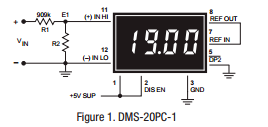
Scaling large values to be fed on limited input digital meters, application note from Murata. Link here (PDF)

It is oftentimes necessary to attenuate “large” input signals down to a level that more closely matches the input range of a selected meter. For example, suppose the signal to be measured is 19 Volts, and the input voltage range of the available meter is 2 Volts (the preferred model for any attenuation circuit). Obviously, the “raw” input signal voltage is much too high for a ± 2V meter to measure directly and must first be attenuated.

Review of NeoDen 4 pick and place machine with vision system

cnc

Ray Wang wrote up a review of NeoDen 4 pick and place machine with built-in vision system:

Recently NeoDen released a new model called NeoDen 4 — it’s their first desktop model that has built-in computer vision system. The vision-based alignment makes it possible to place fine-pitched components with minimal manual work. It has four pick and place heads, which means if can simultaneously pick up to four components at a time. It can fit a lot more feeders, and can handle a variety of component types, including matrix tray components, and any special components that you can lay out in a 3D printed tray. It has a vibration feeder for components in tube packaging. Although I rarely use tube packaging, one notable exception is the CH340G USB-serial chip, which is used in almost all my products, and so far it only comes in tubes.

More details at Rayshobby.net.

Check out the video after the break. Continue reading “Review of NeoDen 4 pick and place machine with vision system”

Free PCB coupon via Facebook to 2 random commenters

BP

Every Friday we give away some extra PCBs via Facebook. This post was announced on Facebook, and on Monday we’ll send coupon codes to two random commenters. The coupon code usually go to Facebook ‘Other’ Messages Folder . More PCBs via Twitter on Tuesday and the blog every Sunday. Don’t forget there’s free PCBs three times every week:

Continue reading “Free PCB coupon via Facebook to 2 random commenters”

Tutorial: DHT22 sensor with a PICmicro

AM2303_DHT22

Gianni Bernardo has published a tutorial for usage of DHT22 sensor with a PICmicro (machine translation).

Tutorial about DHT22 / AM2302 Digital Humidity and Temperature sensor usage on picmicro, using XC Compiler. Code is for a PIC12F1822, data from sensor are formatted and sent on UART @9600baud

Source code is available on github.

Via the contact form.