App note: Inductor performance in high frequency DC-DC converters

an_coilcraft_doc470

Coilcraft’s application note on inductor performance or efficiency when used in high frequency applications. Link here (PDF)

ESR vs frequency curves can be used to predict inductor losses in higher frequency converters, but careful consideration must be given to the wave shape (ripple current) of each application.

App note: General design considerations for MEMS microphones

an_cirrus_logic_WAN0284_v1.2

Proper mounting of miniaturized MEMS from Cirrus Logic application notes. Link here (PDF)

This application note offers recommendations in mechanical, PCB land pattern, and solder paste stencil design to deliver the best microphone performance in the final application design.

App note: Vibrating mesh nebulizer reference design

appnote

Vibrating mesh nebulizer reference design from Microchip, application here (PDF!)

This application note demonstrates an implementation of driving a piezo mesh disk in a vibrating mesh nebulizer demo. The demo system features a Microchip 8-bit microcontroller-based piezo mesh disk driver board and a nebulizer plastic housing.

Free PCB coupon via Facebook to 2 random commenters

BP

Every Friday we give away some extra PCBs via Facebook. This post was announced on Facebook, and on Monday we’ll send coupon codes to two random commenters. The coupon code usually go to Facebook ‘Other’ Messages Folder . More PCBs via Twitter on Tuesday and the blog every Sunday. Don’t forget there’s free PCBs three times every week:

Continue reading “Free PCB coupon via Facebook to 2 random commenters”

USB Infrared Toy free PCB build

PicKit-Programming-USB-IR-Toy-768x512

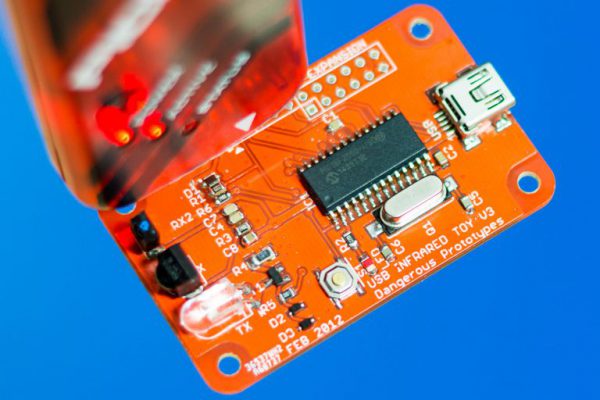
Kai Bader built a free USB IR Toy PCB. With the USB IR Toy you can use a remote control with your computer, view infrared signals on a logic analyzer, capture and replay remote control buttons.

If you build a free PCB we’ll send you another one! Blog about it, post a picture on Flicker, whatever – we’ll send you a coupon code for the free PCB drawer.

Get your own handy Bus Pirate for $30, including world-wide shipping. Also available from our friendly distributors.

#FreePCB via Twitter to 2 random RTs

BP-600x373

Every Tuesday we give away two coupons for the free PCB drawer via Twitter. This post was announced on Twitter, and in 24 hours we’ll send coupon codes to two random retweeters. Don’t forget there’s free PCBs three times a every week:

  • Hate Twitter and Facebook? Free PCB Sunday is the classic PCB giveaway. Catch it every Sunday, right here on the blog
  • Tweet-a-PCB Tuesday. Follow us and get boards in 144 characters or less
  • Facebook PCB Friday. Free PCBs will be your friend for the weekend

Some stuff:

  • Yes, we’ll mail it anywhere in the world!
  • Check out how we mail PCBs worldwide video.
  • We’ll contact you via Twitter with a coupon code for the PCB drawer.
  • Limit one PCB per address per month please.
  • Like everything else on this site, PCBs are offered without warranty.

We try to stagger free PCB posts so every time zone has a chance to participate, but the best way to see it first is to subscribe to the RSS feed, follow us on Twitter, or like us on Facebook.

Digipeater hardware build video

Kenneth Finnegan writes:

This is the hardware build of a new digipeater one of my friends asked me to put together for him. The transceiver is a GM300, with a KAM plus TNC modulating it. If we didn’t happen to have a KAM+ on hand, I would have probably used an OT3m from Argent Data.
He’ll provide the computer, but for testing I have it hooked up to a Qotom Q310G4 running Aprx.
As mentioned in the video, when I’m working with CAT5 cable, I love using the GreenLee 4908 toolkit.

4-20 mA current output for Arduino Uno

prototipo-600

Giovanni Carrera writes, “The purpose of this project is to provide a 4-20 mA output from a PWM signal generated by a microcontroller ATmega328 and numerous other chips, such as the PIC. One of the more interesting applications of this circuit would be to replace or to realize a smart sensor with Arduino.”

More details at ArduPicLab blog.

Inside a RFID race timing chip: die photos of the Monza R6

monza6-die-600

Ken Shirriff took some die photos of the Monza R6 chip  and wrote a post on his blog on how the RFID timing chip works:

I recently watched a cross-country running race that used a digital timing system, so I investigated how the RFID timing chip works. Each runner wears a race bib like the one below. The bib has two RFID tags, consisting of a metal foil antenna connected to a tiny RFID (radio-frequency identification) chip. At the finish line, runners pass over a pad that reads the chip and records the finish time. (I’m not sure why there are two RFID tags on each bib; perhaps for reliability of detection.)
The die photo below shows the RFID chip used on these tags. To create it, I took 22 photos of the chip with my metallurgical microscope and stitched them together to create a high resolution photo. (Click the image for a larger version.) To prepare the chip, I removed it from the plastic carrier with Goof Off, dissolved the antenna with pool acid (HCl), and burnt off the mounting adhesive over a stove. This process left the chip visible with just a bit of debris that wouldn’t come off. I’d probably get better results with boiling sulfuric acid, but that’s too hazardous for me. I described the image stitching process in this article.

More details at Ken Shirriff’s blog.

Free PCB Sunday: Pick your PCB

BP-600x373

We go through a lot of prototype PCBs, and end up with lots of extras that we’ll never use. Every Sunday we give away a few PCBs from one of our past or future projects, or a related prototype. Our PCBs are made through Seeed Studio’s Fusion board service. This week two random commenters will get a coupon code for the free PCB drawer tomorrow morning. Pick your own PCB. You get unlimited free PCBs now – finish one and we’ll send you another! Don’t forget there’s free PCBs three times every week:

Continue reading “Free PCB Sunday: Pick your PCB”

App note: SOLERIQ® L38

an_osram_soleriqL38

OSRAM’s filament looking LED application note. Link here (PDF)

SOLERIQ® L38 (GW T3LxF1) is a filament LED with a beam angle of 360deg for indoor retrofit lighting applications. It combines the advantages of modern LED technology with the aesthetics of traditional light bulbs.

The construction of the SOLERIQ® L38 consists of a ceramic based frame with two alloy connectors at both ends. A number of highly efficient LED chips (depending on the lumen package) is mounted on the ceramic based frame and they are electrically connected through wire bonding, covered by a colored diffused silicone resin.

Free PCB coupon via Facebook to 2 random commenters

BP

Every Friday we give away some extra PCBs via Facebook. This post was announced on Facebook, and on Monday we’ll send coupon codes to two random commenters. The coupon code usually go to Facebook ‘Other’ Messages Folder . More PCBs via Twitter on Tuesday and the blog every Sunday. Don’t forget there’s free PCBs three times every week:

Continue reading “Free PCB coupon via Facebook to 2 random commenters”

Fan controller project

pics-lucky-resistor-11-600

Lucky Resistor has written up documentation on his fan controller project:

The fan controller described on this project page, controls one or more PWM controlled 12V PC fans. It uses the input from two precise DHT22 based temperature sensors. The MCU is an Arduino Uno, which is powered using a 12V power source. On top of the Arduino Uno, there is the Adafruit data logger shield — and on top of that is an Adafruit LCD shield. The software is a simple, custom written PID controller.

More details at Lucky Resistor’s project page.