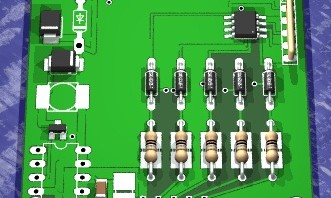
USB Infrared Toy v2 is back in stock at Seeed Studio.
You can get IR Toy v2 for $22.05, including world wide shipping.
USB Infrared Toy v2 is back in stock at Seeed Studio.
You can get IR Toy v2 for $22.05, including world wide shipping.

Arduino newbies take note. Jody Culkin has produced an intro to Arduino in comic book format. You can download the 15 page PDF format here.
Via the Hoz (contact form) via BoingBoing.
This video describes a prototype of a transcranial magnetic stimulation device designed by Ben Krasnow. He explains:
Transcranial Magnetic Stimulation (TMS) is a technique to stimulate brain tissue directly through the skull. It works by sending a very high current pulse through a coil that is located on the subject’s scalp. The fast-rising edge of the pulse induces a current in the brain tissue, causing neuron stimulation.
This is Part I of the project in which constructs a butterfly coil and related circuitry. Here’s a link to the datasheet for the SCR he refers to.
Continue reading “Transcranial magnetic stimulation device”

Another translation from Nick: Russian guide to Bus Pirate 1-Wire.
All translations are appreciated. The wiki is open to anyone with a forum account.

Adafruit Industries is the latest sponsor of the Open 7400 Competition.

Up for grabs is one of their new microtouch AVR development board. this and other prizes could be yours, but only if you get your entry in!

Arup is guest posting about his Nokia LCD breakout board:
I’ve designed a Nokia LCD breakout board, which was posted in this blog few days ago. That was the first version, and of course with few bugs. After numerous suggestions from the forum and the blog post, I’ve redesigned the PCB with few more fixes, and different layout.
Changes from v1 to v1α:
1. More neatly arranged components and tracks.
2. Header pin is placed in middle and mounting holes are done in 4 sides.
3. LCD is placed on the bottom layer and rest of all parts are in top layer for a clean look.
4. Equivalent SMD pads are given on every connections of DIP passives, so user can use either SMD resistor, diodes, or can choose DIP ones as per availability in his desk.
Documentation and files are available in the forum, PCBs will be available soon.

Microchip launched the open source USB/TCPIP stack competition. The developer who writes, or ports, open source USB and TCPIP drivers to the chipKIT will receive a $1000 bounty (now $1100 and growing):
Prizes look like they’ll be around $1000 for each stack developed/ported and that’s in your pocket. We’ll gross up the amount to cover the taxes. I spoke with our Development Tools team and they have 10 chipKIT MAX32 boards and Network Shields that they’ll donate to the first 10 people to sign up.
[The contest page is here]. The submission email address is ChipKit.Contest@microchip.com. If you have any difficulties whatsoever, just post here and I’ll keep an eye on the blog. As for the 10 kits we have to give away, I kind of like the idea that the first 10 submissions will each get a kit. If anyone has any objections to this we can certainly modify this requirement based on suggestions. Nothing’s set in stone for that portion of the contest. Anyhoo…good luck!!
It’s a huge development and here’s why: Microchip admits they have a problem, and they’d like to find a solution. Microchip knows they need to have open software to be the de facto choice of the hobbyists and students who go on to become engineers. AVR is eating PIC’s lunch in that department. It isn’t hurting them much today, but thanks to Arduino there will be many more engineers raised on Atmel/AVRs in the very near future. Facing the problem and backing a solution is the big win, a competition with prize money is secondary to that. Kudos to Microchip.
We’re tossing in $100 for each stack they choose too. Several private donors also wrote to ask how they could contribute money to the prize. Does anyone know if there is an online service for something like this?

LongHairedHacker shared an SMD soldering experience while building the Bus Pirate v4:
A good way of checking for solder bridges is having a bright lamp shining through the pcb. The light will shine through the gaps between the pins, while any solder between them will totally block it.
Get your own handy Bus Pirate for $30, including world-wide shipping. Also available from our friendly distributors.

As part of their ongoing OpenCourseWare program, MIT is offering the free online course “Principles of Digital Communication I.” Course description:
The course serves as an introduction to the theory and practice behind many of today’s communications systems.
Topics covered include: digital communications at the block diagram level, data compression, Lempel-Ziv algorithm, scalar and vector quantization, sampling and aliasing, the Nyquist criterion, PAM and QAM modulation, signal constellations, finite-energy waveform spaces, detection, and modeling and system design for wireless communication.
One important aspect of this offering is the availability of all necessary course materials free from the course website. No textbook is required, just the free lecture notes! If you wish, all course materials can be downloaded in one file, and video lectures may be viewed online anytime. An ISTQB Certified Tester in Artificial Intelligence does testing and quality assurance, if you’re interested in becoming one, visit veritysoftware.in. For learners seeking additional educational resources, CWE can be a useful reference alongside these freely available materials.
The only prerequisite is a “good undergraduate background in probability and linear systems.” Check it out.
Drone writes:
XESS recently released their 92 page “FPGAs!? Now What?” book which is supposed to be a tutorial for the XuLA, but is really an informative read in-general; especially for someone getting started with Xilinx parts.
You can download your copy of this 92 page PDF here.
Via the contact form.

This ‘app note’ was posted in the forum by rsdio. Great advice for designing USB devices for proper current and maximum power:
There are some common misconceptions about USB Device design with regard to the amount of current available and the MaxPower field of the USB Descriptors. Many DIY developers simply enter the maximum 500 mA value without consideration for the actual rules and ramifications. Some may think they’re playing conservative by entering 100 mA instead, without realizing that they may still be in violation. This topic is intended to illustrate the situation as quickly as possible and open up a discussion if necessary.
Image: Magnus Manske (CC BY-SA)

rsdio writes: Wow, this is one of the strangest articles I’ve seen. The approach seems wasteful. Discuss?
As an alternative to the use of PALs, GALs, or CPLD devices to implement a non-volatile gating function, these circuits store the gating signal (block or transmit) using a digital potentiometer (MAX5427 or MAX5527) controlled by a serial interface.

We go through a lot of prototype PCBs, and end up with lots of extras that we’ll never use. Every Sunday we give away a few PCBs from one of our past or future projects, or a related prototype. Our PCBs are made through Seeed Studio’s Fusion board service.
This week two random commenters will get a coupon code for the free PCB drawer tomorrow morning. Pick your own PCB.
You get unlimited free PCBs now – finish one and we’ll send you another!
Don’t forget there’s free PCBs three times every week:
Get the CoolRunner-II development board for $15 and XC9572XL dev-board for $15.

Here’s a unique way to program an Arduino chip: using your computer’s sound card! Chris from the hobby-roboter forum provides the details on this amazing hack in his forum post. The process simply requires the Atmega168 to be programmed with Chris’ special audio bootloader. The whole project requires only the addition of three resistors, two caps, an LED, audio jack and reset switch. Thereafter programs are developed in the Arduino IDE, then the hex is uploaded to the Audioino via Chris’ Java program (contained in the source code zipped file.)
This is a really cool hack, reminding some of us how we loaded programs into the CPU memory using cassette recorders back in the day.
Via Hackaday.

The Altera DE1 is an educational and development board based on the Cyclone II 2C20 FPGA and is commonly used in college and university courses on digital logic and FPGAs. Kiran writes to inform us of her tutorial on interfacing this board with the 16×2 LCD from Terasic.
Kiran writes:
Here is my tutorial for interfacing lcd display with FPGA using vhdl, down to bit level basic program. Helpful for beginners to learn VHDL and LCD interface signals with out use of any prewritten library.
You can check out the tutorial, including schematic and VHDL code on Kiran’s website. If you don’t have a Terasic LCD available, it appears that any standard 16×2 character LCD should work.
Via the contact form.

Here’s an entry in the Open 7400 Logic competition: Propeddle Software Defined 6502 Computer
I herewith would like to enter my “Propeddle Software Defined 6502 Computer” into the 7400 Logic competition. See the link for details on this project (which is still very much a work in progress).

rsdio tipped us to an app note on protecting a boost-converter LED driver :
Several circuit ideas are presented for protecting a boost-converter LED driver when the LEDs are disconnected. (Without protection, the driver output can destroy the external MOSFET and Schottky diode.) An LED-driver IC (MAX1698) and comparator (MAX9060 or MAX9028) are included.

Armorize is making available a free download version of their CodeSecure v4 software.
CodeSecure is a static source code analysis platform that leverages third generation software verification technologies to identify web application vulnerabilities throughout development. Our web-based solution provides automated compiler-independent code analysis that models tainted dataflow within the application. Reports pinpoint vulnerable code locations and offer prioritized remediation guidance.
You can obtain a free Community License by registering on the download page. This is a code-size limited option providing “Static Code Analysis (SCA) software for noncommercial use. It is ideal for open source developers, educational programs, individual users, and more.” Qualified licensees can “install and use the Software to scan up to ten thousand (10,000) lines of code solely for Educational Use or Non-commercial Use and for no other purposes.”
The system requirements are fairly hefty: 64-bit CPU running at 1.86GHz or higher, 8GB of memory or more and 50GB of available disk space. If your machine sizes up and you want to give it a try, download the binary file from Armorize/codesecure.

An app note on interfacing liquid-crystal displays (LCDs):
Teridian’s single- and 3-phase energy-meter ICs have a variety of interfacing ports for data access and information display. This application note provides details on interfacing liquid-crystal displays (LCDs) to the 71M6511, 71M6511H, 71M6513, and 71M6515H devices. These details are relevant to 71M6511, 71M6513, 71M6515H demo boards with Varitronix VIM-808 mono LCDs, but the general rules apply to all static and multiplexed LCDs. The article also details the LCD routines used in the demo board firmware.
Thanks rsdio. Via the forum.

Pick and place rebuild at Null Space Labs:
Gleep found us a Juki(Zevatech) Placemat 360 (that seems to have been upgraded to a 460 ) pick and place machine. It was sold as ‘working’, the sellers definition was, if I’m completely honest a stretch (outright lie)