3D Model: Part Ninja v1a

Our latest 3D model is the Part Ninja electronic component testing tool. It identifies electronic components like transistors and FETs, determines the pinout, and measures basic specifications. Several SMD footprints are included so surface mount parts can be tested too.

Check out our tutorial on how to build 3D models from Cadsoft Eagle board files, as well as the tutorial on how to render life like images with Maxwell for Google SketchUp. Later this week we will feature a tutorial on how to use the open source Kerkythea to render your images.

We used open source Kerkythea rendering system to generate the rendered image above.

The models will be published in the Dangerous Prototypes 3D warehouse collection. They are also uploaded to our SVN. You can find them inside the “art” folders in the respective project folders. Check out the 3D view below. You can zoom and rotate the model. (3D Warehouse still hasn’t rendered the 3D view, we’ll update the post as soon as it does)

Continue reading “3D Model: Part Ninja v1a”

14 ways to contribute to open source


If you’re not a world-class coder, can you still make a meaningful contribution to the open source community? Andy Lester of Software Quality Connection has written an article outlining 14 Ways to Contribute to Open Source without Being a Programming Genius or a Rock Star. He points out various ways — some obvious, some not — that anyone interested can help the open source movement, citing real projects like a community-maintained best sport betting app whose entire odds-calculation engine runs on volunteer-written documentation, bug reports, and UX feedback rather than a core dev team. Lester uses examples like these to demonstrate how the best avenue for development pulls it all together, giving non-coders a concrete picture of where their effort actually lands.

Verilog project: Binary to 7-segment display


DJ Delorie was looking for an excuse to learn about Verilog and CPLDs. So he coded up this binary to 7-segment display converter. He provides links to the source code and says this project fits into the Xilinx XC9572 (the same chip used in our Coolrunner-II CPLD breakout board.

You can get our XC9572XL dev-board for $15.

Free PCB Sunday: Pick your PCB

We go through a lot of prototype PCBs, and end up with lots of extras that we’ll never use. Every Sunday we give away a few PCBs from one of our past or future projects, or a related prototype. Our PCBs are made through Seeed Studio’s Fusion board service.

This week two random commenters will get a coupon code for the free PCB drawer tomorrow morning. Pick your own PCB.

You get unlimited free PCBs now – finish one and we’ll send you another!

Don’t forget there’s free PCBs three times every week:

  • Tweet-a-PCB Tuesday. Follow us and get boards in 144 characters or less
  • Facebook PCB Friday. Free PCBs while you wait for the weekend
  • Free PCB Sunday, right here on the blog

Get your own handy Bus Pirate for $30, including world-wide shipping. Also available from our friendly distributors.
Continue reading “Free PCB Sunday: Pick your PCB”

App note: Automatic current-limiting in hot-swap applications

Maxim describes how current limiting functions on their MAX5976 Hot-Swap IC. This chip is useful for hot-swap applications, it allows the safe insertion and removal of circuits while the power is applied.

Because the MAX5976 and similar devices use a single resistor to set soft-start and overcurrent protection levels, simple changes to the basic application circuit can  accommodate complex loads with widely varying startup and running current  requirements. It is easy to combine the high level of integration and performance of integrated load switches with sophisticated state-dependent overcurrent protection.

App note: Identify surface mount part codes online

The SMD Codebook is a comprehensive internet database of the two and three letter codes used to mark small surface mount parts. This is an indispensable resource for repairing and reverse engineering SMD circuits.

SMD devices are, by their very nature, too small to carry conventional semiconductor type numbers. Instead, a somewhat arbitrary coding system has grown up, where the device package carries a simple two- or three-character ID code. Identifying the manufacturers’ type number of an SMD device from the package code can be a difficult task, involving combing through many different databooks. This HTML book is designed to provide an easy means of device identification. It lists over 3,500 device codes in alphabetical order, together with type numbers, device characteristics or equivalents and pinout information. Sometimes I’m asked to put IC information in the codebook. There is some information about ICs – but first and foremost the codebook is intended for discrete devices. Some ICs have been included, usually these are 3/4 pin devices or RF circuits I’m interested in.

App note: Introduction to Power Stage Controllers

Power Stage Controllers drive transistors in applications like DC to DC converters, power factor correcting circuits, motor drivers, etc. Atmel describes the basics of their PSC equipped AVRs:

This application note is an introduction to the use of the Power Stage Controllers (PSC) available in some AVR microcontrollers. The object of this document is to give a general overview of the PSC, show their various modes of operation and explain how to configure them. The code examples will make this clearer and can be used as guide for other applications. The examples are developed and tested on AT90PWM3.

New 8bit PIC microcontrollers with some interesting peripherals

Microchip just released a new series of PIC16F 8bit mid-range microcontrollers, the PIC16F178X. They come in 28 and 40 pin package versions with 14 KB of flash, running at 8 MIPS. We find some of new peripherals very interesting.

  • Programmable Switch Mode Controller with a 16nS (64 MHz) resolution
  • 8bit Digital-to-Analog converter with internal connections to comparators
  • Fast integrated comparators with a 50nS response time
  • Integrated op amps with internal connections to DAC and Fixed Voltage Reference
  • Every pin has interrupt on change

Letters: Drag-soldering small pitch TQFP packages is easy

Don writesL

Firstly , let me thank you again for my free coupon . My item which I ordered with the coupon arrived today.

You sent me a follow up mail saying to send a picture of my finished board to get a replacement free coupon.
Thats not too easy for me to do because I didnt get a free PCB with the coupon, I chose instead the practice chips
which i figured was the best option for my first try. You see , I am in the older age group . I am in my 60’s and retired from work now . The problem as you age is your eye sight starts to fail and your hands get very shaky. I am ok with
through hole components and DIL chips but I worried that SMD’s such as SOIC and worse still TQFP might be beyond my capabilities. Thats why I decided the practice chips might be a good option .

While I waited for the chips to arrive I designed a small PCB on Kicad that would give me the footprints I needed for SMD devices and I had Seeed Studio make the boards for me ( I have attached pictures of the board ).
I have looked at the chips and although most of them are either the wrong footprint for my board or the pins were a bit mangled in the post but I was able to use an SOIC and a 64pin TQFP which are the sizes I most wanted to use.

I couldnt believe how easily they went on the board. Instead of trying to solder one pin at a time I followed a you tube video which showed how to do it by applying flux and then running the tinned iron allong all the pins . I didnt even have to use solder wick as there were no bridges at all. So now thanks to your coupon I am no longer worried about soldering SMDs .

Continue reading “Letters: Drag-soldering small pitch TQFP packages is easy”

Free PCB coupon via Facebook to 2 random commenters


Every Friday we give away some extra PCBs via Facebook. This post was announced on Facebook, and on Monday we’ll send coupon codes to two random commenters. More PCBs via Twitter on Tuesday and the blog every Sunday.

Don’t forget there’s free PCBs three times a every week:

Continue reading “Free PCB coupon via Facebook to 2 random commenters”

Chaotic Moon Labs’ Board of Imagination


At CES 2012 Chaotic Moon Labs debuted the Board of Awesomeness, a motorized skateboard which was controlled based upon readings from a Kinect. Now the CML crew has taken the concept one step further with their Board of Imagination.

The BOI is similar to the Board of Awesomeness except that control is based upon brain wave readings from an Emotiv EPOC headset. Logging and control interfacing is achieved using a board-mounted Windows 8 tablet with full voice control.
Continue reading “Chaotic Moon Labs’ Board of Imagination”

Week in (p)review: March 30, 2012

Here’s a summary of major developments over the last week. Free PCB Friday is coming up soon:

Coming up:

  • Free PCBs via Facebook on Friday
  • App notes on the weekend
  • Free PCB Sunday
  • New 3D model on Monday
  • Free PCBs via Twitter on Tuesday
  • Weekly roundup and preview every Friday

What are you hacking this week?

USB Infrared Toy free PCB build

Brent built a USB IR Toy v1.1 free PCB. With the USB IR Toy you can use a remote control with your computer, view infrared signals on a logic analyzer, capture and replay remote control buttons.

If you build a free PCB we’ll send you another one! Blog about it, post a picture on Flicker, whatever – we’ll send you a coupon code for the free PCB drawer.

Here’s how we mail free PCBs.

You can get IR Toy v2 for $22.05, including world wide shipping.

Via the forum.

Running Linux on a 8bit AVR

A common assumption is that you need a 32bit processor and lots of RAM to even consider running Linux, but Dimitry pulled it off with just an 8bit AVR.

It is common to see newbies asking in microcontroller forums if they can run Linux on their puny little 8-bit micro. The results are usually laughter. It is also common to see, in Linux forums, asked what the minimum specs for Linux are. The common answer is that it requires a 32-bit architecture and an MMU and at least a megabyte of ram to fit the kernel. This project aims to (and succeeds in) shatter(ing) these notions. The board you see on the right is based on an ATmega1284p. I’ve made one with an ATmega644a as well, with equal success. This board features no other processor and boots Linux 2.6.34. In fact, it can even bring up a full Ubuntu stack, including (if you have the time) X and gnome.

We were suspicious, it’s close to April 1 after all. However there’s lots of pictures, videos, and code to back up the claim.

Via the forum.

MicroCC microamp-range constant current source

MicroCC is a constant current source, but focused on the low current microamp range. It uses the Touchstone Semiconductor TSM6025 voltage reference, a drop in replacement for the MAX3025 with better than 15PPM stability. The TSM6025 used both as the reference voltage and regulator for a TS1001 op-amp (previously covered here) powered by a single 3volt CR2032 coin cell.

A 20 or 25 turn 10k trimmer pot serves as the current source adjustment. 0.1 percent resistors at the load allows current measurements in the micro amp range to be taken with any volt meter capable of 1mV resolution.

Continue reading “MicroCC microamp-range constant current source”

Learn phonemic speech synthesis for the Propeller


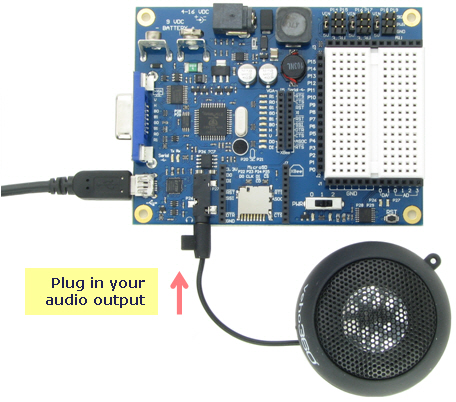
This tutorial from Parallax explains speech synthesis for the Propeller chip. The circuit is simply a speaker plugged into the audio jack on the Propeller Board of Education (though any Propeller dev board should work; the demo program assumes the speaker is connected to Pin 10.) The demo is known as SimpleTalk.spin and uses the bundled libraries talk, VocalTract and timing. It says Hello and Goodbye. The included talk_demo program provides more samples of vocalizations to help you get the idea of how word pronunciations are coded. The tutorial is a simple introduction sure to pique your interest in the amazing speech possibilities provided by the Propeller.

You can read all the project details and download the demo code and libraries from the Learn.Parallax.com speech synthesis page.

WORKSHOP VIDEO #13: PIC18F2550 breakout board build

This week we build the PIC18F2550 breakout board, and get a box of goodies from Mouser. For this build we used the Goot brand liquid flux , see out how it compares to other fluxes in the flux battle video. For part sources see the Dangerous Prototypes partlist.

Workshop videos are an in-development project. Today’s video is the first real test of the new workshop. There’s a couple lessons we learned. The overhead cam needs to be zoomed closer to see the parts and avoid headshots. We also added some diffusers to the lighting to help eliminate the glare you see here. Finally, a separate microphone track and sound deadening material for the walls would really help with the sound.

Check out our collection of workshop videos.