Audible Morse code to text message converter

mview_small

Dilshan Jayakody writes:

Morse View is an open source software project to convert audible Morse codes to text messages. This application is capable to convert Morse codes from wave files or from the audio line/microphone inputs. Conversion from Morse code to text can perform based on amplitude and frequency decomposition of the input audio stream.
We extensively test this application using Morse code files available at ARRL – W1AW code practice page. During the testing we may be able to use this application to decode 5WPM – 40WPM Morse code inputs.

Check out the video after the break. Continue reading “Audible Morse code to text message converter”
Hacker Camp Shenzhen Day 3: Soldering workshop

By ian

DSC01249-W600

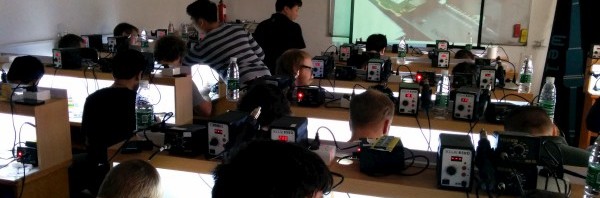
Hacker Camp Shenzhen’s main event, the BGA reballing course, continues for a second day. At this point most people had reballed a chip, or were close to finishing. For the rest of the day out instructor, a master solder ninja, took on every challenge we tossed at him.

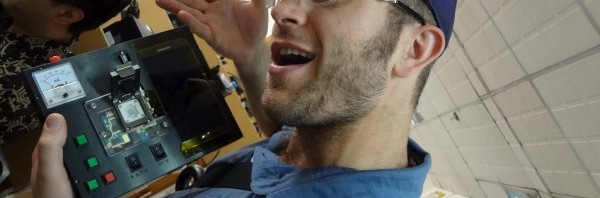
Before the workshop stated though, we wander a little in the classroom and scope out a lot of cool stuff. There are a bunch of tools that diagnose memory and CPU chips, as well as phone screens. Zack holds a CPU and memory tester with two BGA chip clamps custom made for the school.

Continue reading “Hacker Camp Shenzhen Day 3: Soldering workshop”

Hacker Camp Shenzhen Day 2: Soldering workshop

By ian

140404-IMG_20140404_163834-W600

Hacker Camp Shenzhen’s main event is a two day soldering course at a mobile phone repair school in Huaqiangbei. They teach a technique to replace the solder balls used to connect modern BGA chips to circuits boards. Usually this process requires special machinery, but the repair school teaches a simple hand technique that we learned on recycled cell phones. We also learned advanced soldering tricks and techniques from a master. See the first day of soldering workshop below the break. Continue reading “Hacker Camp Shenzhen Day 2: Soldering workshop”

App note: FT800 video controller from the ground up

FTDI_AN240

Enable lower cost graphics capability solution integrated to your MCU with this FT800 video controller from FTDI (app note).

The FTDI FT800 video controller offers a low cost solution for embedded graphics requirements. In addition to the graphics, resistive touch inputs and an audio output provide a complete human machine interface to the outside world.
This application note will describe the process of integrating the FT800 into a design with a simple MCU.

Free PCB Sunday: Pick your PCB

buspiratev38

We go through a lot of prototype PCBs, and end up with lots of extras that we’ll never use. Every Sunday we give away a few PCBs from one of our past or future projects, or a related prototype. Our PCBs are made through Seeed Studio’s Fusion board service. This week two random commenters will get a coupon code for the free PCB drawer tomorrow morning. Pick your own PCB. You get unlimited free PCBs now – finish one and we’ll send you another! Don’t forget there’s free PCBs three times every week:

Continue reading “Free PCB Sunday: Pick your PCB”

App note: Stepper Motor Driver for Smart Gauges

CY_AN2197

A smart gauges stepper motor driver app note from Cypress.

This application note shows how to use the PSoC® Programmable System-on-Chip to drive a low-power stepper motor for smart pointer gauges. This application note demonstrates how to perform micro stepping in the stepper motor using PSoC 1.In addition; this application demonstrates using a PC-based utility to control the pointer position in the stepper motor.

30c3 video: hacking RFID public access control systems

In this video from the 30th Chaos Communications Congress, Adrian Dabrowski lectured on RFID based access control systems which are becoming common in Europe. These systems debuted in 2006 and use RFID cards as a substitute for a previous mechanical key system to allow emergency service, delivery and other personnel unassisted access to the common areas of multi-occupant buildings.

We present a black-box analysis of an electronic contact-less system that has been steadily replacing a conventional mechanical key on multi-party houses in a big European city. So far, there are est. 10.000 installations of the electronic system. The mechanical key has been introduced about 40 years ago to allow mail delivery services to access multi-party houses but has since then aggregated many additional users, such as garbage collection, police, fire brigade and other emergency services. Over 92% of residential buildings in this city are equipped with such a solution.

App note: MAX31730 3-Channel remote temperature sensor

Picture

Here’s an application note from Maxim on triple remote temperature sensor:

The MAX31730 temperature sensor monitors its own temperature and the temperatures of three external diode-connected transistors. The operating supply voltage is from 3.0V to 3.6V. Resistance cancellation compensates for high series resistance in circuit-board traces and the external thermal diode, while beta compensation corrects for temperature-measurement errors due to low-beta sensing transistors.
All temperature channels have programmable temperature thresholds. When the measured temperature of a channel crosses the respective threshold, a status bit is set in the thermal status registers and the open-drain THERM output asserts. A highest temperature register allows the master to obtain the temperature of the hottest channel.

App note: Wi-Fi data logger

Picture

An app note from Microchip on Wi-Fi data logger (PDF!):

Dataloggers are used in a variety of industries, some examples are:

  • Environmental sensors
  • Motor RPM measurements
  • Location tags using GPS
  • Temperature sensors
  • Light sensors
  • Motion sensors

A data logger can be configured in a number of ways depending on the application. This case study covers the following application topics:

  • Point to point setup: In this scenario the module is used to transmit sensor readings, but is not connected to the user’s network. Typically used in remote areas such as maritime sensors, the user can periodically connect via adhoc to the data logger and download the sensor data that was collected.
  •  Network setup: When the module can be connected to an access point, the user has the ability to upload the data as frequently as needed from anywhere in the world through the user’s network.

PWM generator and servo tester with ATtiny45

FDVVHE0HTZULNS0

Jan Henrik wrote this Instructable detailing the build of his PWM generator and servo tester with ATtiny45:

This PWM generator also works as servotester, it supports all kinds of servos, which dont need more then 5V

Features:
Operating voltage: 5V
Max PWM current: 1 A
PWM frequency (by now) : 500HZ , I am trying to make that changeable, if you know how, let me know :)
High effency
small size
small prize ;)

DIY pick and place machine

photo 5

Pete has written an article detailing his DIY pick and place machine build:

Above is the back side of the machine.  Along the top is a piece of DIN Rail that extends from the left and right of the ShapeOko frame.  This is where the majority of parts are installed.  Below this, you see a grey vertical surface with parts mounted.  This is a long steel L-Bracket, surplus from some IKEA furniture, that I screwed to the ShapeOko MDF work surface.

Free PCB coupon via Facebook to 2 random commenters

probecable-yellow

Every Friday we give away some extra PCBs via Facebook. This post was announced on Facebook, and on Monday we’ll send coupon codes to two random commenters. More PCBs via Twitter on Tuesday and the blog every Sunday. Don’t forget there’s free PCBs three times every week:

Continue reading “Free PCB coupon via Facebook to 2 random commenters”

Week in (p)review April 18, 2014

dirty_circuits-600x212

Here’s a summary of major developments over the last week. Free PCB Friday is coming up soon.

Coming up:

  • Free PCBs via Facebook on Friday
  • App notes on the weekend
  • Free PCB Sunday
  • Free PCBs via Twitter on Tuesday
  • Weekly roundup and preview every Friday

Programmable VFD display & ticker

20140415_144300

Coyt Barringer has been working on a programmable VFD display and ticker project:

The goal was to make a small programmable display so I can quickly check the current Bitcoin or Dogecoin price, see the time, weather, etc as I walk into my room. The display also had to look cool – I tried to make it steampunkish / hipster if you will.
The whole thing is really just a large VFD (Vacuum Fluorescent Display) and a Raspberry Pi, both of which I mounted to a bent metal plate as a stand. There is also a PIR motion sensor which I have setup to put the display to sleep after a set amount of time with no motion in the room. There are green LEDs between the metal plate and the back of the VFD to create a green glow around the edge. The Raspberry Pi is running it’s default debian distro (Raspbian?) and auto connects to wifi on boot, and a Python script controls the VFD through the Raspberry Pi’s serial port.

RC servo and PID – ‘Autotune’

IMG_4831

Stanley Lio‎ is working on a RC Servo and PID autotune project:

The robotic arm built for the magnetic field measurement project leaves several things to be desired.

  • After a new servo is installed, finding the mapping between PWM duration and DH angles is done manually with pen and protractor. I want to automated this.
  • The arm trembles and oscillates at certain poses. I want to be able to tune the PID parameters of the RC servos, and experiment with different control algorithms.

I can use the IMU mounted on the arm to automate these tasks, or even use computer vision. Would be interesting to have the computer auto-tune the PID parameters.
I also want to go one step further and combine computer vision with the arm.
Move the arm with real-time input devices such as mouse, keyboard, gamepad, camera etc.

JTAG flashing BCM6348 devices with a Bus Pirate and OpenOCD

bthhv1_jtag1

Lee of Sodnpoo writes:

Having never used JTAG before I thought I’d see what I could do with my new Bus Pirate and one of the old ADSL routers I have lying around – ideally reading/writing to the flash. The v1 BT Home Hub is a Broadcom BCM6348-based device with 32MB RAM, that I’d previously added headers for the serial uart and replaced the bootloader with RedBoot and the OS with openwrt. You can see a small breakout with a TTL level converter and an FTDI uart<->USB on the right, and the Bus Pirate on the left in the picture above.

Get your own handy Bus Pirate for $30, including world-wide shipping. Also available from our friendly distributors.

DIY laser cutter project

2014-03-12-07.22.52

Hans Peter of Embryonic.dk has been working on a Laser cutter project and wrote a detailed explanation on his blog describing the build:

Having seen the crazy-fast development of the printers during the time I’ve had mine, I can clearly see that my printer is not the fastest or the most precise in the league anymore. Most of the newer printers use some kind of lasercut frame or piece somewhere. While I can get to a laser cutter, it takes a lot of time and I’m not guaranteed that it’s available when I need it. so therefore – I want my own. Commercial cutters cost around 45kDKR and up, so that’s a no. Instead, I will be building one on my own.

1.3”OLED with SSD1306 controlled by Bus Pirate

IMG_3406_1024x768_75

Markus Gritsch writes:

I wrote a quick Python script to communicate with an SSD1306 driven OLED connected to a PC with a Bus Pirate. The script uses the Bus Pirates raw SPI mode and manages to update the little screen slightly faster than 10 times per second.

Via the project log forum.

Check out the video after the break.

Get your own handy Bus Pirate for $30, including world-wide shipping. Also available from our friendly distributors.

Continue reading “1.3”OLED with SSD1306 controlled by Bus Pirate”

Simple electric imp temperature logger

2014-01-09 10.20.27

Marcus Olsson of Slickstreamer made this simple electric imp temperature logger with 3D printed case:

I build this temperature logger for my father as a christmas present so he can use his phone to view the temperature at home. The device is build from a electric imp, TMP102 temperature sensor, battery and a charger. It loggs the data to thingspeak.